

 +1 credit
| Version | Summary | Created by | Modification | Content Size | Created at | Operation |
|---|---|---|---|---|---|---|
| 1 | Gorazd Gorup | -- | 1874 | 2025-10-03 12:56:08 | | | |
| 2 | Catherine Yang | Meta information modification | 1874 | 2025-10-09 05:19:21 | | |
Video Upload Options
Urban planning has become increasingly complex, necessitating the use of digitized data, large-scale city scans, and advanced tools for planning and development. Recent advancements in open-source 3D modelling software Blender have introduced powerful procedural editing tools like geometry nodes alongside robust mesh and curve manipulation capabilities. These features position Blender as a viable and cost-effective alternative to proprietary solutions in urban planning workflows. This study identifies common requirements, tasks, and workflows associated with cityscape transformation and visualization, implementing them within Blender’s environment. Documented working examples are provided, including procedural editing, cloud painting, and mesh transformation operations, demonstrating Blender’s versatility. To evaluate its practicality and performance, we conducted a comparative analysis with the Rhinoceros Grasshopper, a widely used tool in urban planning.
1. Introduction and Background
Point clouds are sets of points in space, where each point is defined by its coordinates and an arbitrary number of attributes. We find point clouds in many perception and 3D recognition tasks, simulations, as well as real environment modelling[1][3][4]. The latter has become popular due to advances in capturing technologies such as LiDAR or photogrammetry[2]. Point clouds of scanned urban areas can contain hundreds of millions of points, each representing a portion of a surface in the 3D environment.
As far as urban design is concerned, point clouds are usually used only as a means of storing captured data and for visualisation, since point editing is often impractical and not compatible with recent visualisation techniques, such as 3D Gaussian Splatting[5].
To edit point clouds, we often need to convert them into a representation with more mature editing support, e.g., mesh geometry or curves. This conversion can result in inaccuracies and loss of information[6].
Some commercial solutions for point cloud editing exist, such as Rhinoceros 3D, Autodesk Revit, Pix4D, ArcGIS, DJI Modify, Tcp Point Cloud Editor, Vega, 3D Survey, and CloudCompare, but are limited either to certain specific features (empty space filling, recolouring, transforming the point cloud as a whole) or do not have fine-grained control over individual points and their attributes, and lack good point visualisation capabilities.
We therefore propose a non-destructive approach to point cloud editing, showcasing some novel forms of editing with painting tools as well. Non-destructive editing allows for adding, removing, and swapping
operations without having to repeat the same procedure each time, making it suitable for creative decision-making and iterative urban design workflows.
We extend the open-source 3D modelling software Blender to better support the LAS point cloud file format. We use Blender's Geometry Nodes feature to showcase non-destructive editing and combine it with Grease Pencil tools to explore some interesting editing possibilities. Finally, we compare editing and rendering of point clouds with Rhinoceros and its node editor, Grasshopper.
For point cloud visualisations, Tokyo LiDAR data was used, which is openly available on Tokyo Digital Twin 3D Viewer, under the section Shinjuku Ward, figure 09LD1638.
2. Methods
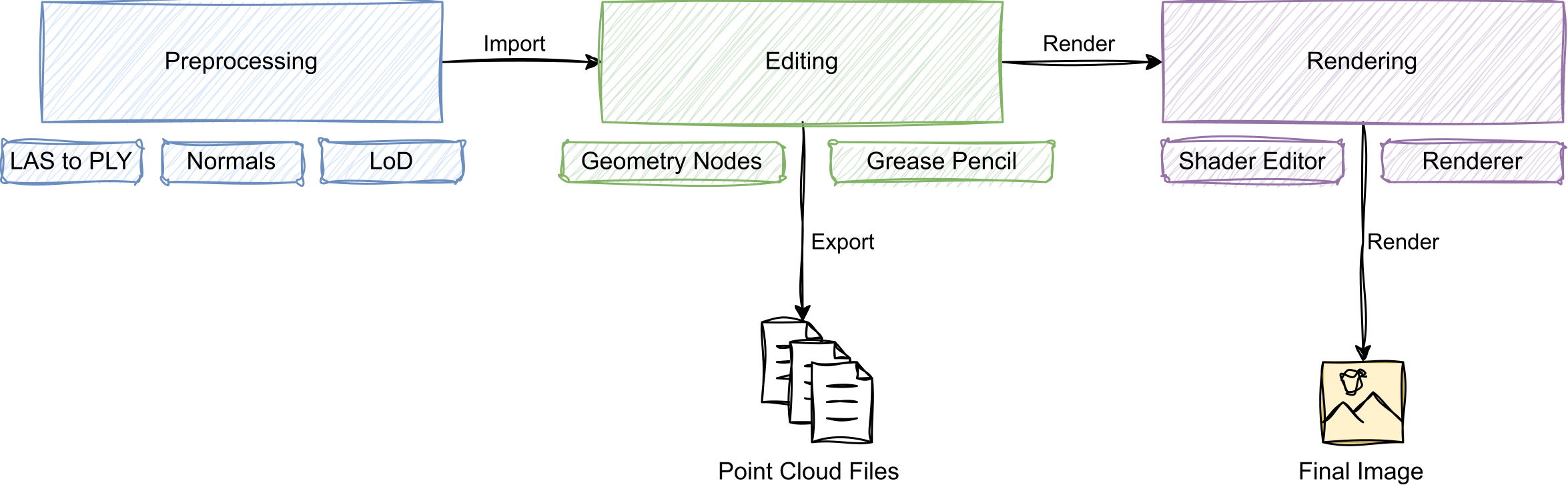
We constructed a point cloud editing pipeline as presented in the graphic below. We extended Blender's user interface (UI) to allow importing LAS files. After the file is read and preprocessed, it is added as a collection of mesh objects. Then, Geometry Nodes, Grease Pencil, and other Blender tools can be used to operate on the point cloud. Once we are done with editing, we can proceed to export the data into one of Blender's supported formats or render an image.
The point editing and visualisation workflow. The point cloud is preprocessed and imported into Blender, then edited using Geometry Nodes and optionally Grease Pencil, and finally rendered or exported.
2.1. Preprocessing
We used our extension to load LAS point cloud files in Blender. Because the overall point locations may be far from the Blender world origin, the cloud is re-centred for easier navigation and editing.
The extension then separates points into levels of detail (LoD), which allows for the point cloud to be shown at different resolutions. Based on hardware and system requirements, the user can increase or decrease point cloud resolution. After LoD sorting, points are further split by their classification identifiers (ground, building, vegetation, etc.).
Afterwards, the points are integrated into Blender's working environment as mesh objects, with points represented by unconnected vertices. Here, each object contains points of specific LoD and classification, so we can exploit Blender's object visibility system to offer LoD and classification visibility toggling.
Mesh objects are converted to point clouds via Geometry Nodes (with Mesh to Points node). This step could also be done after other Geometry Nodes operations (but before setting the material onto points), since we only need this point representation for previews and rendering.
We found that for previewing point clouds in Blender's viewport, Material Preview shading mode is sufficient, providing colouring and basic shading of points. When using the EEVEE rendering engine, disabling shadow calculations greatly improves rendering performance.
2.2. Editing
We tested some editing operations that we found useful in urban planning scenarios. All operations were performed with Geometry Nodes.
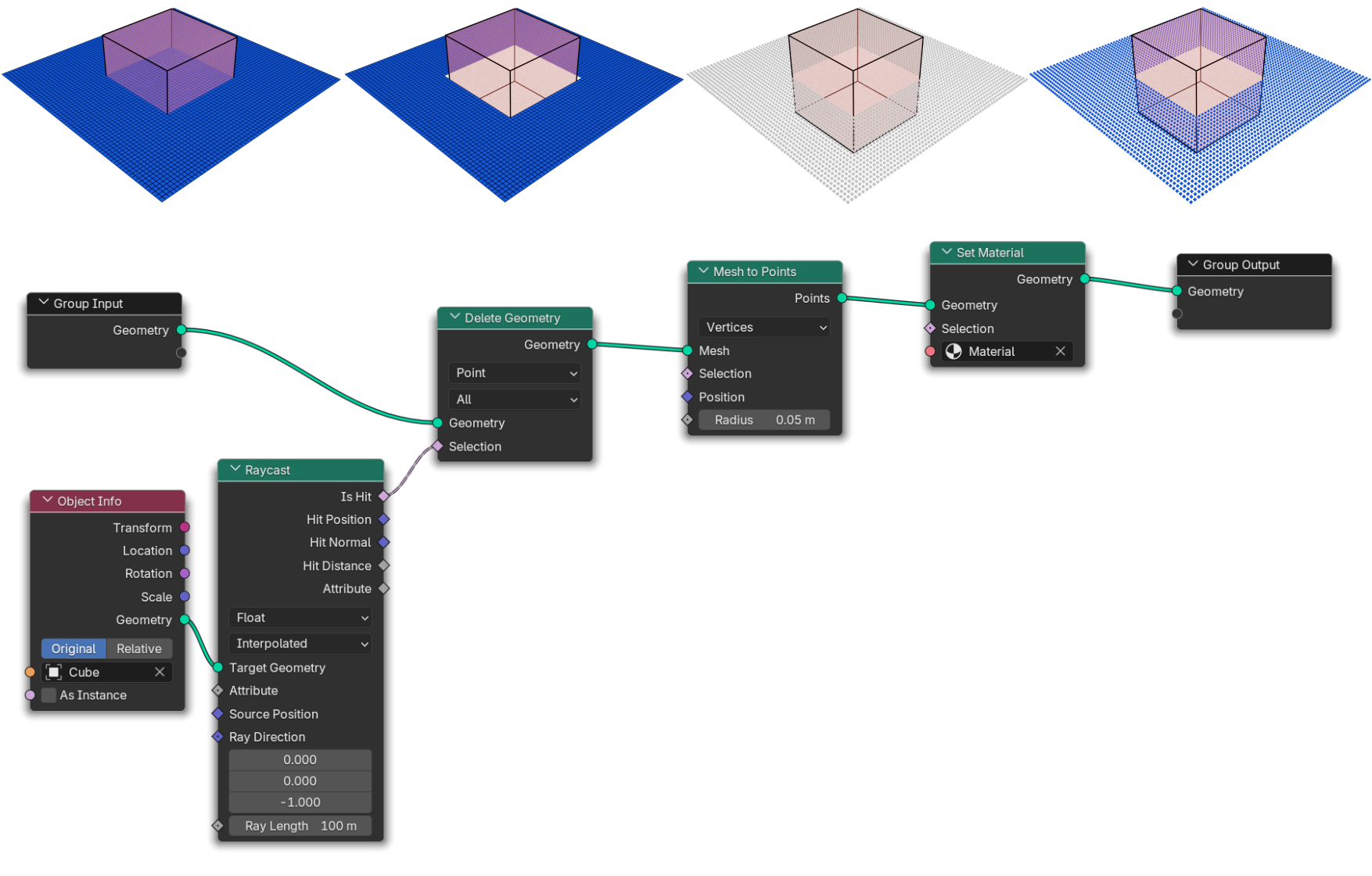
Geometry Nodes take geometry data as input, operate on it, and output the result for Blender to use in previews and rendering. Individual nodes can represent operations on geometry, such as geometry removal, ray-casting, and transformations, or mathematical operations (vector maths, comparisons, etc.), or other capabilities, e.g., importing other objects from the scene, generating random values, or applying procedural textures.
An example of the Geometry Nodes node tree, applied to the blue plane, can be seen above. At the top, the Blender viewport renderings of various stages in Geometry Nodes processing are shown: the first one shows geometry before Geometry Nodes are applied, the second one shows the geometry with Delete Geometry node applied, the third shows the effect of Mesh to Points node on the plane (we also see that the geometry loses its material), and finally the effect of Set Material is shown. In the bottom half of the graphic, we see the corresponding node tree.
In our operations, we set some parameters (which points should be affected by the operation, for example) to depend on external objects in the scene, e.g., mesh cubes, spheres, and empty objects. Modifying these objects with Blender's tools was, in our case, more intuitive and provided better control over the operation.
It is important to note that after each modification of geometry, it loses its applied material, so it has to be applied again afterwards with Set Material node. Our approach was to set the material in a separate Geometry Nodes group that was always last in the execution stack; therefore, all editing had been done before that.
For some operations, Grease Pencil tool was used. It allows for drawing lines in 3D space and represents strokes with curves, which can be manipulated with Geometry Nodes as well.
The following editing operations were performed:
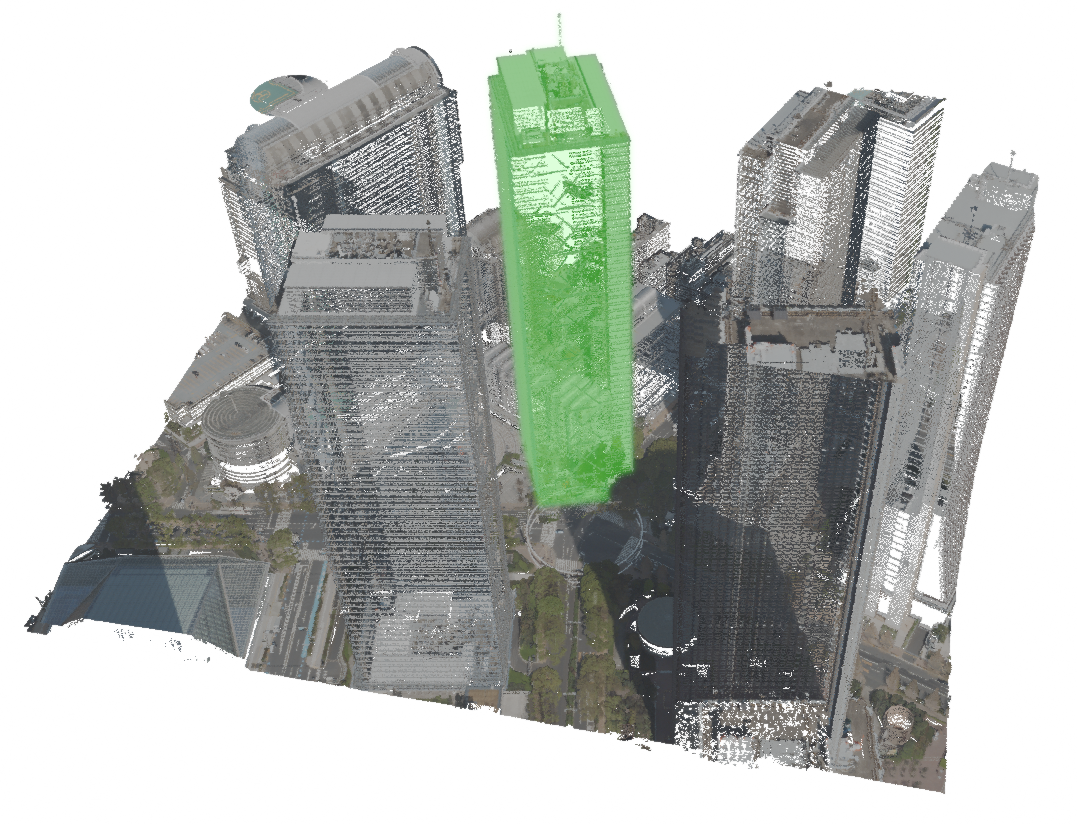
- Point Copying. A selection of points is duplicated and transformed in space. Quick designs of new buildings, trees and other structures can be made by reusing existing parts of the point cloud. The operation is shown below.
Point copying example. We show the original point cloud on the left, and the result of the copying operation on the right. Copied points are coloured green. 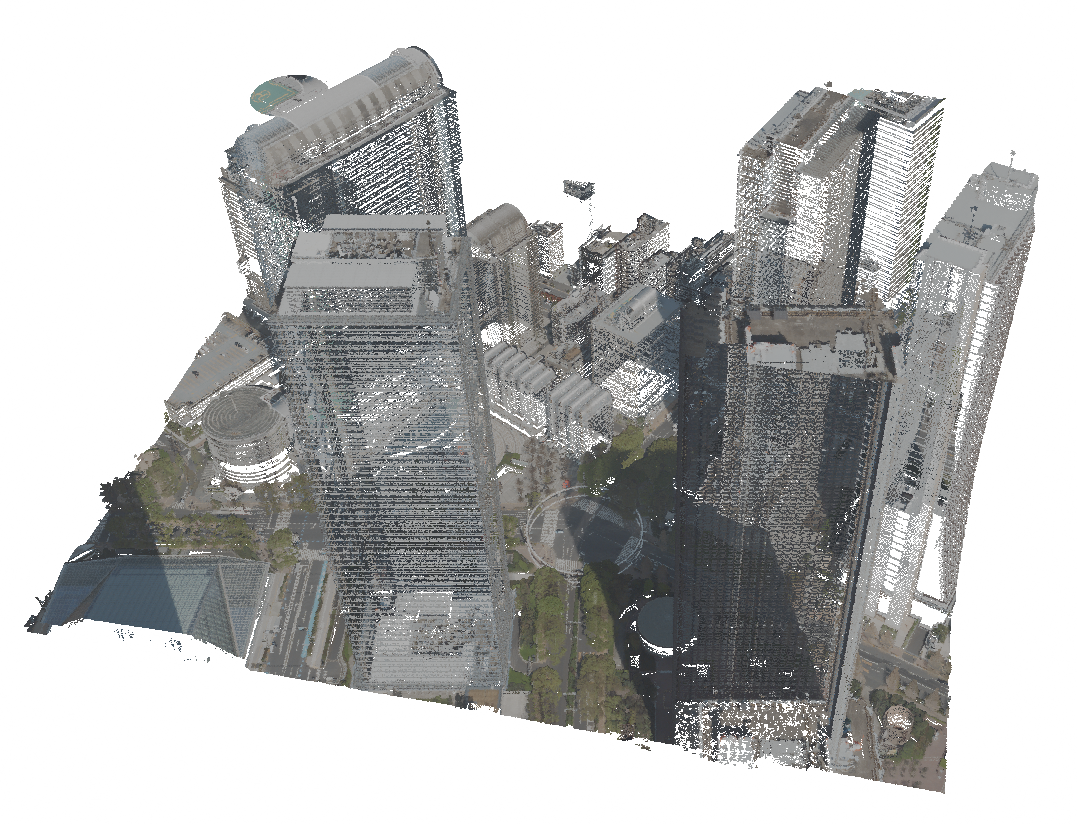
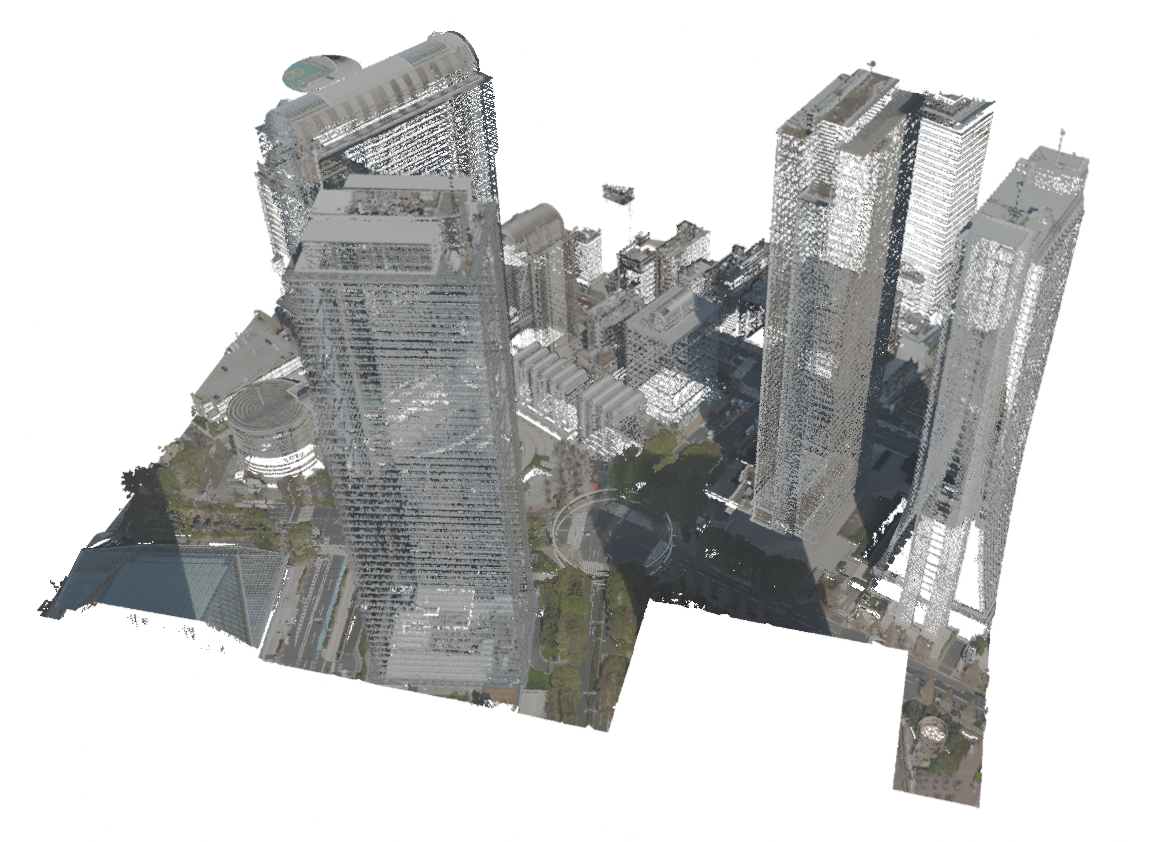
- Point Removal. A selection of points is deleted. Structures can be removed from the point cloud. The operation is shown below.
Point removal example. We show the original point cloud on the left, and the result of point removal on the right. 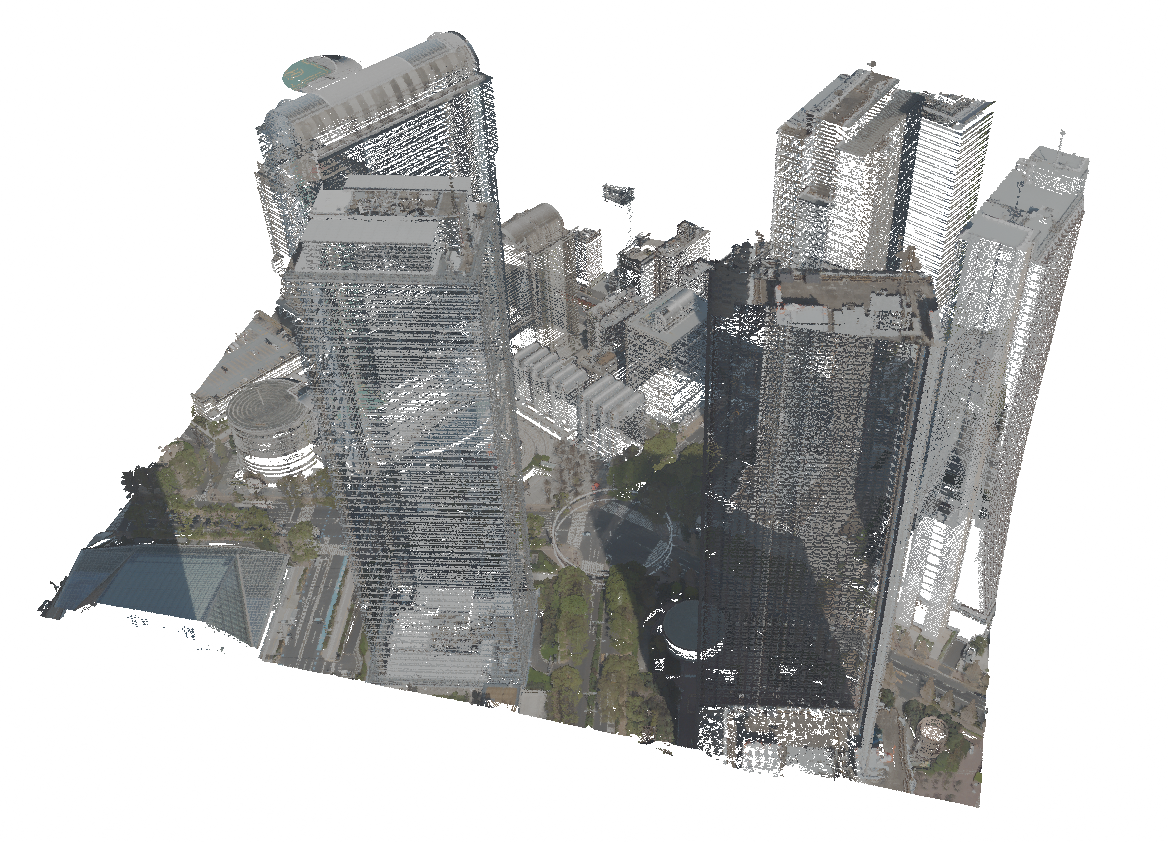
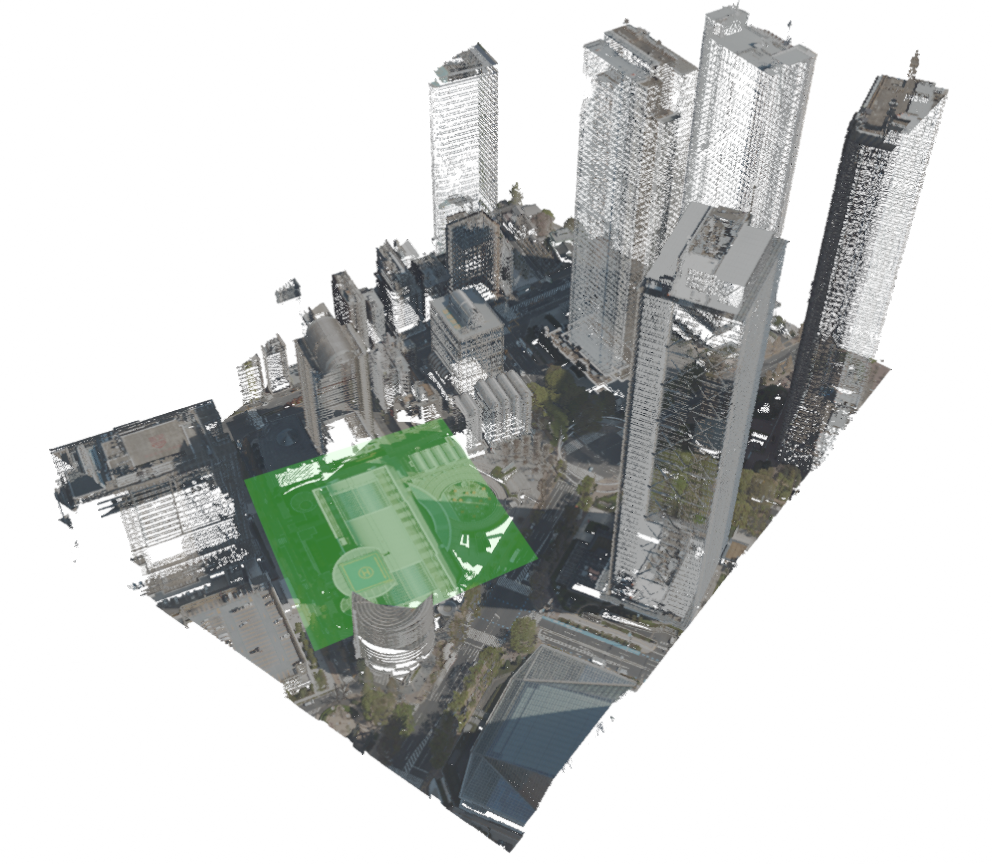
- Point Flattening. A point cloud region is flattened to a plane, e.g. to remove a building and reconstruct the ground in its place. The operation is shown below.
Point flattening example. We show the original point cloud on the left, and the result of point flattening on the right. The flattened points are marked with green colour. 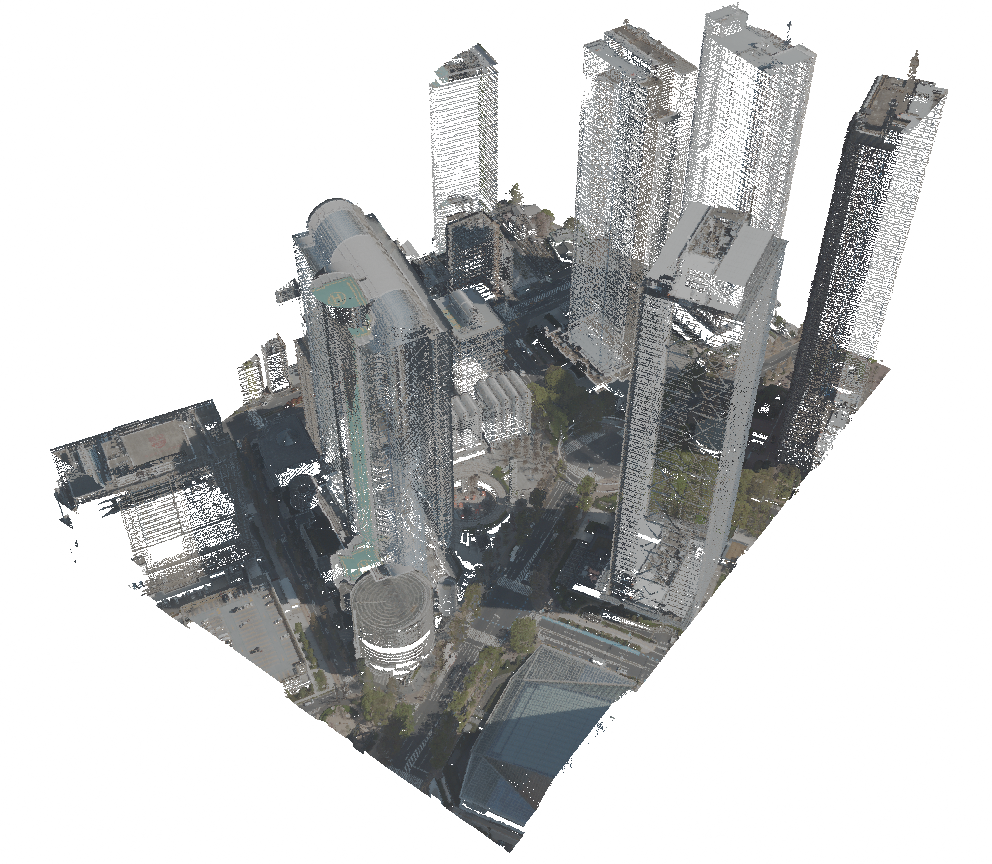
- Mesh to Point Conversion. A modelled mesh object can be converted to a point cloud by sampling points on its surface. This helps integrate custom 3D models made with traditional modelling and sculpting techniques into the point cloud.
- Point Drawing. Grease Pencil is used to draw 3D curves, on which the points are sampled. This approach is useful when filling irregular surfaces, modelling organic shapes, or marking specific regions.
- Point Painting. Specific points can be marked for planning purposes by drawing Grease Pencil strokes over them.
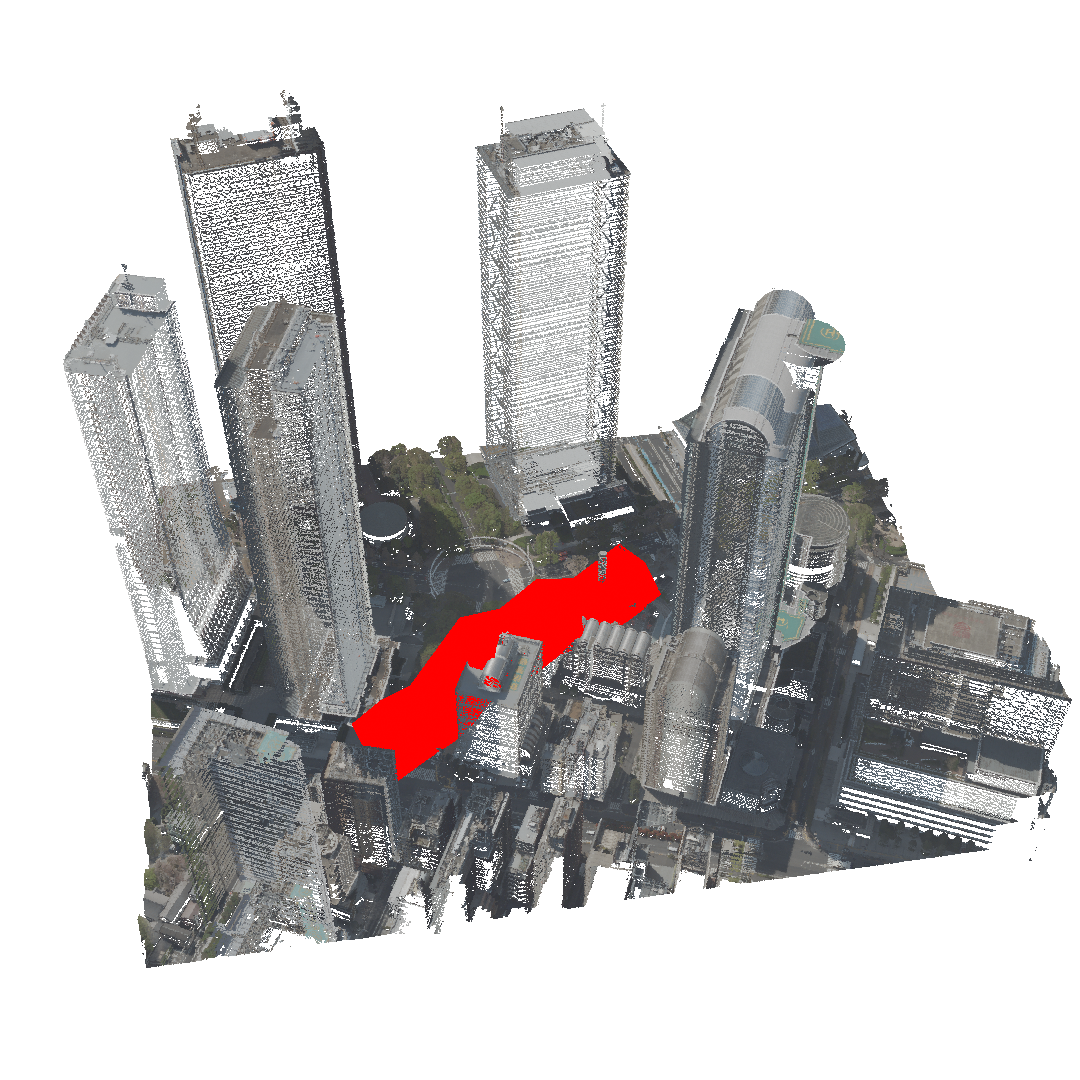
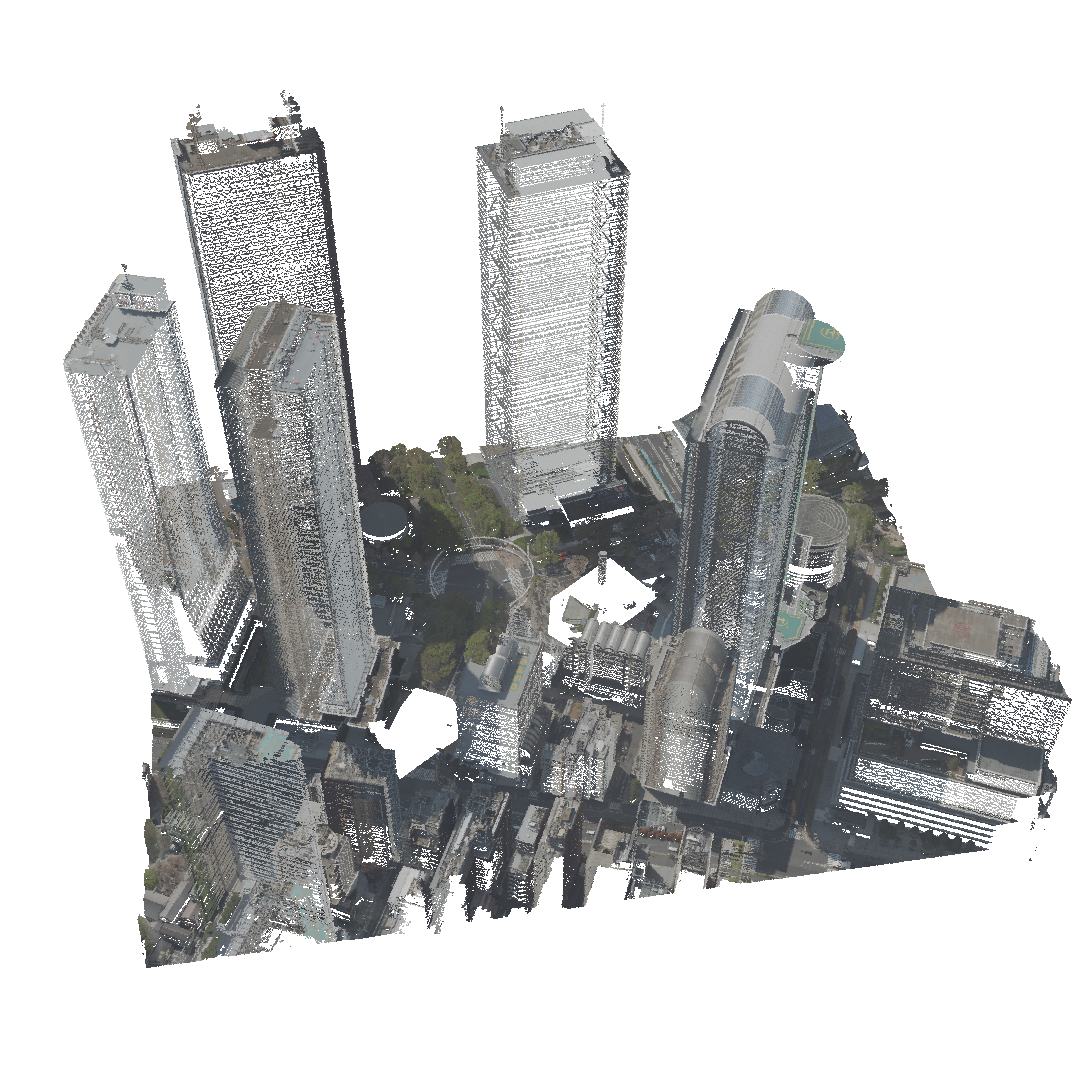
- Point Erasing. Points contained in Grease Pencil strokes are erased. This can be used in removing specific artefacts and noise, or regions with irregular shapes and densities. The operation is shown below.
 |
 |
The last three operations introduce some novel ways to edit point clouds via more artistic and free-form manipulation.
2.3. Visualization
In previous sections, we mentioned how to set materials on point clouds. We use materials to instruct Blender on how to render surfaces. We can visualise different point attributes, such as colour, normal vector, classification, infrared channel, etc. Blender allows us to choose between two rendering engines: Cycles, which offers photorealistic path-traced rendering, and EEVEE, which is faster but less physically accurate.
3. Results
For editing, we compared selected operations in Blender and Rhinoceros Grasshopper, excluding Grease Pencil operations since we could not find a comparable tool in Rhinoceros. Blender version 4.4 and Rhinoceros 8 were used. Geometry Nodes performed the same operations a few orders of magnitude faster and with fewer nodes than Grasshopper. The latter also had limited access to point attributes and could not modify them efficiently. Rhinoceros did, however, respond better when transforming the point cloud as a whole, with Blender producing noticeable lag on the same dataset. Overall, Rhinoceros was more prone to crashes and extended periods of unresponsiveness.
When using Grease Pencil on large point clouds, we noticed a considerable reduction in performance, too significant for uninterrupted drawing.
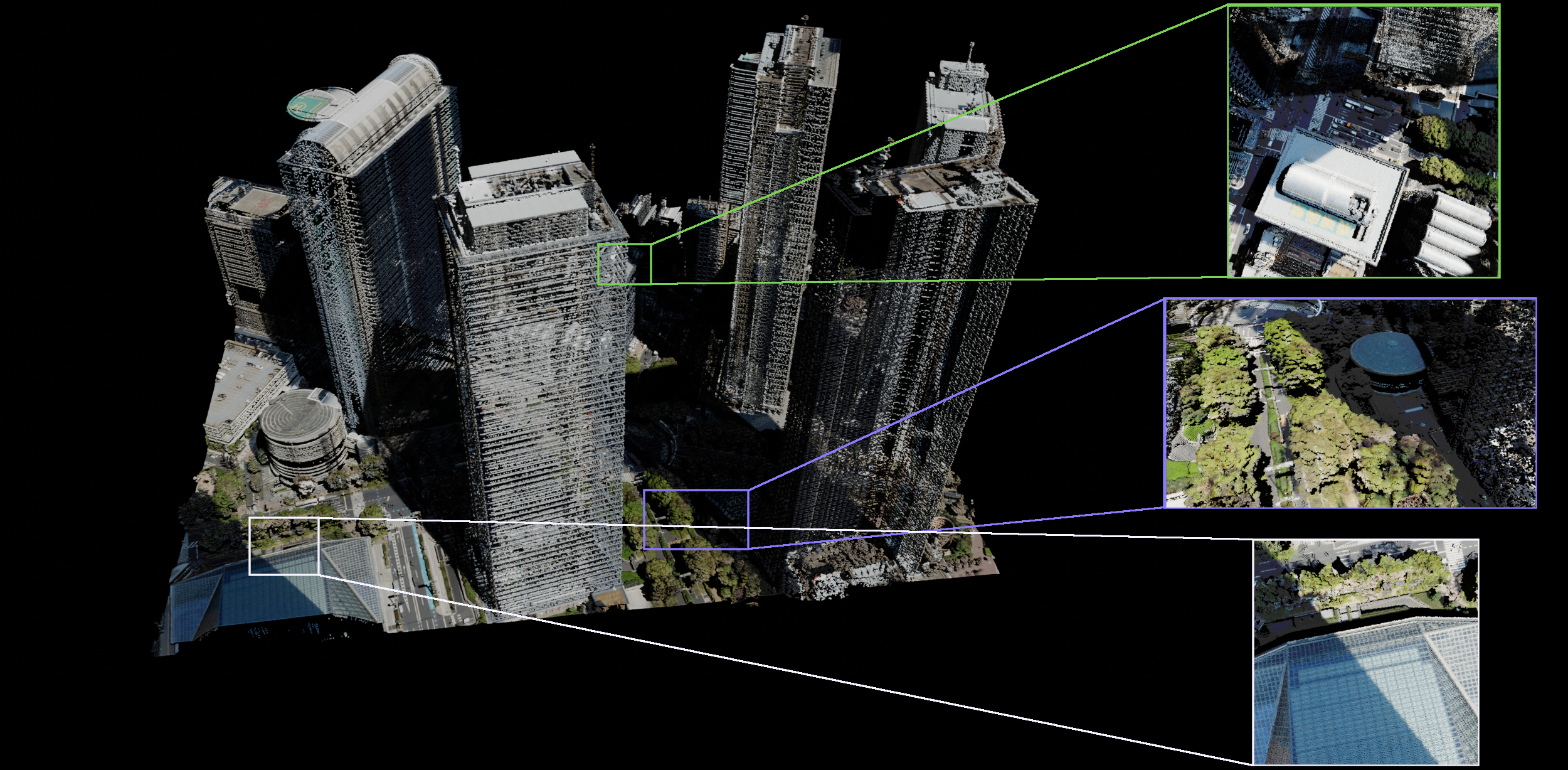
We also compared the visualisation capabilities of Blender Cycles renderer and Rhinoceros's integrated renderer. The results of Cycles are visible in the images below. Rhinoceros rendered point clouds the fastest, but also did not use shading or shadow-casting, which made the visualisations look flat and less visually appealing. Both Blender engines were slower, with EEVEE being faster than Cycles. The visualisations were more appealing, adding shading to the points, and allowed for presenting different attributes as point colours.
Point cloud rendered in Rhinoceros. Interesting regions are highlighted, showing that points are not shaded and do not scale with the 3D view, causing the surfaces to disappear upon zooming in.
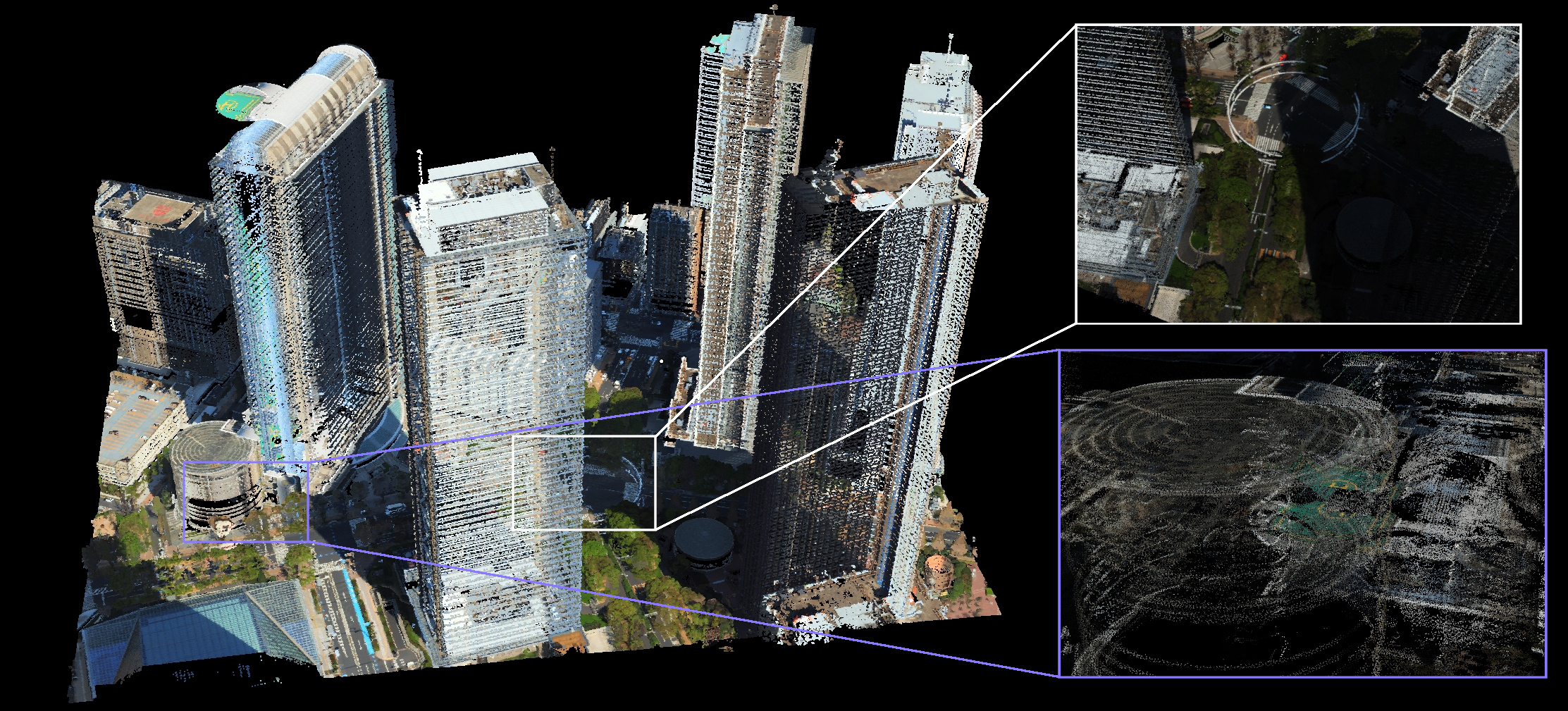
Point cloud rendered in Rhinoceros. Interesting regions are highlighted, showing that points are not shaded and do not scale with the 3D view, causing the surfaces to disappear upon zooming in.
4. Conclusions
Blender remains stable while handling even large point clouds. Geometry Nodes provided a valuable tool for the design and editing of point clouds. It allows for fast non-destructive editing of geometry and is suitable in combination with other modelling techniques for flexible editing of point clouds for urban planning applications. Fine-grained control over point attributes also offers more editing and visualisation options. All this makes Blender a promising candidate for augmenting urban design processes in the future.
References
- Aldoma, Aitor and Marton, Zoltan-Csaba and Tombari, Federico and Wohlkinger, Walter and Potthast, Christian and Zeisl, Bernhard and Rusu, Radu Bogdan and Gedikli, Suat and Vincze, Markus. Tutorial: Point cloud library: Three-dimensional object recognition and 6 dof pose estimation. IEEE Robotics & Automation Magazine. 2012, 19, 80-91.
- Raj, Thinal and Hashim, Fazida Hanim and Huddin, Aqilah Baseri and Ibrahim, Mohd Faisal and Hussain, Aini. A Survey on LiDAR Scanning Mechanisms. Electronics. 2020, 9(5), 741.
- Ryan S. DeFever; Colin Targonski; Steven W. Hall; Melissa C. Smith; Sapna Sarupria; A generalized deep learning approach for local structure identification in molecular simulations. Chem. Sci.. 2019, 10, 7503-7515.
- Philipp R.W. Urech; Maria Angela Dissegna; Christophe Girot; Adrienne Grêt-Regamey; Point cloud modeling as a bridge between landscape design and planning. Landsc. Urban Plan.. 2020, 203, 0.
- Bernhard Kerbl; Georgios Kopanas; Thomas Leimkuehler; George Drettakis; 3D Gaussian Splatting for Real-Time Radiance Field Rendering. ACM Trans. Graph.. 2023, 42, 1-14.
- ZhangJin Huang; Yuxin Wen; ZiHao Wang; Jinjuan Ren; Kui Jia; Surface Reconstruction From Point Clouds: A Survey and a Benchmark. IEEE Trans. Pattern Anal. Mach. Intell.. 2024, 46, 9727-9748.